How to Organize a Wine Cellar: A Collector's Complete Guide
Madeleine Cruickshank
June 4, 2026 · 5 min read
A disorganized cellar costs more than time. Bottles get opened past their peak because nobody noticed the window was closing. Duplicates get bought because the existing stock wasn't visible. Special bottles get forgotten because they were buried behind everyday drinkers.
The good news is that organizing a wine cellar is not complicated. It requires a system, a consistent habit, and the right tools to make that system last. This guide covers all three.
Why Cellar Organization Matters
What do you actually gain from an organized wine cellar?
An organized cellar gives you three things that a disorganized one cannot: speed, clarity, and control.
If you organize your wine cellar, you know exactly where each bottle is located, saving valuable time. That's the practical argument, but the strategic one matters more. An organized wine cellar helps you track inventory, identify gaps in your collection, avoid redundant purchases, and give yourself permission to expand thoughtfully.
For collectors managing more than 50 bottles, organization is the difference between a cellar that serves you and one you've lost track of. At 200 bottles without a system, you're effectively managing a library with no catalogue.
Step 1: Choose an Organization System
What is the best way to organize a wine cellar?
The best organization system is the one that matches how you actually use your cellar. There is no universal answer, but there are four approaches that work well for serious collectors, each with distinct advantages.
Organize by Region
Grouping wines by where they come from (Burgundy, Napa, Tuscany, Rhone, and so on) is the most intuitive system for collectors who think geographically about wine. Organizing by region works particularly well for collectors who hope to have an international assortment, as it makes it easy to spot which areas are lacking and plan future purchases accordingly.
The main advantage of a regional system is that it reflects how wine is actually made and discussed. When you're looking for something to serve with dinner, you typically think in regional terms first.
Organize by Drinking Window
Grouping wines by when they should be opened (ready now, drinking well in two to five years, and long-term holds) creates a practical priority system that prevents bottles from being forgotten until they're past their peak.
This approach works especially well when combined with a digital tool that tracks drinking windows automatically. Rather than manually calculating when each bottle should be opened, the system does it for you and surfaces ready bottles on demand.
Organize by Style
Separating reds, whites, sparkling, rosé, and dessert wines is the simplest organizational approach and the most accessible for collectors who entertain frequently. Organizing by style is a simple, effective option that makes it easy to navigate by occasion rather than by producer or region.
The limitation is that style organization doesn't account for drinking windows, price, or provenance, so it works best as a secondary layer within a broader system rather than as a standalone approach.
Organize by Producer
For collectors who belong to wine clubs, a producer-based system is especially valuable. Over time, it allows you to build vertical collections, or multiple vintages from the same winery, which adds depth to the tasting experience and can increase resale value.
Producer organization is most useful for collectors with deep holdings in specific wineries rather than broad international collections.
The Most Practical Approach: Combine Systems
Most serious collectors use a hybrid. A common and effective combination is to organize by region at the top level, then by drinking window within each region. This tells you both what you have and when to open it, which covers the two most important questions a cellar needs to answer.
Step 2: Map Your Physical Storage
How do you physically organize a wine cellar?
Before you can track what's in your cellar, you need to know where everything lives. Physical organization means assigning every bottle a specific location (rack, shelf, row, slot), and maintaining that assignment consistently as bottles come and go.
Proper labeling is key to maintaining an organized wine cellar. Use wine tags that include the name, vintage, and region. For larger collections, consider labeling the shelves themselves to make it easy to identify sections at a glance.
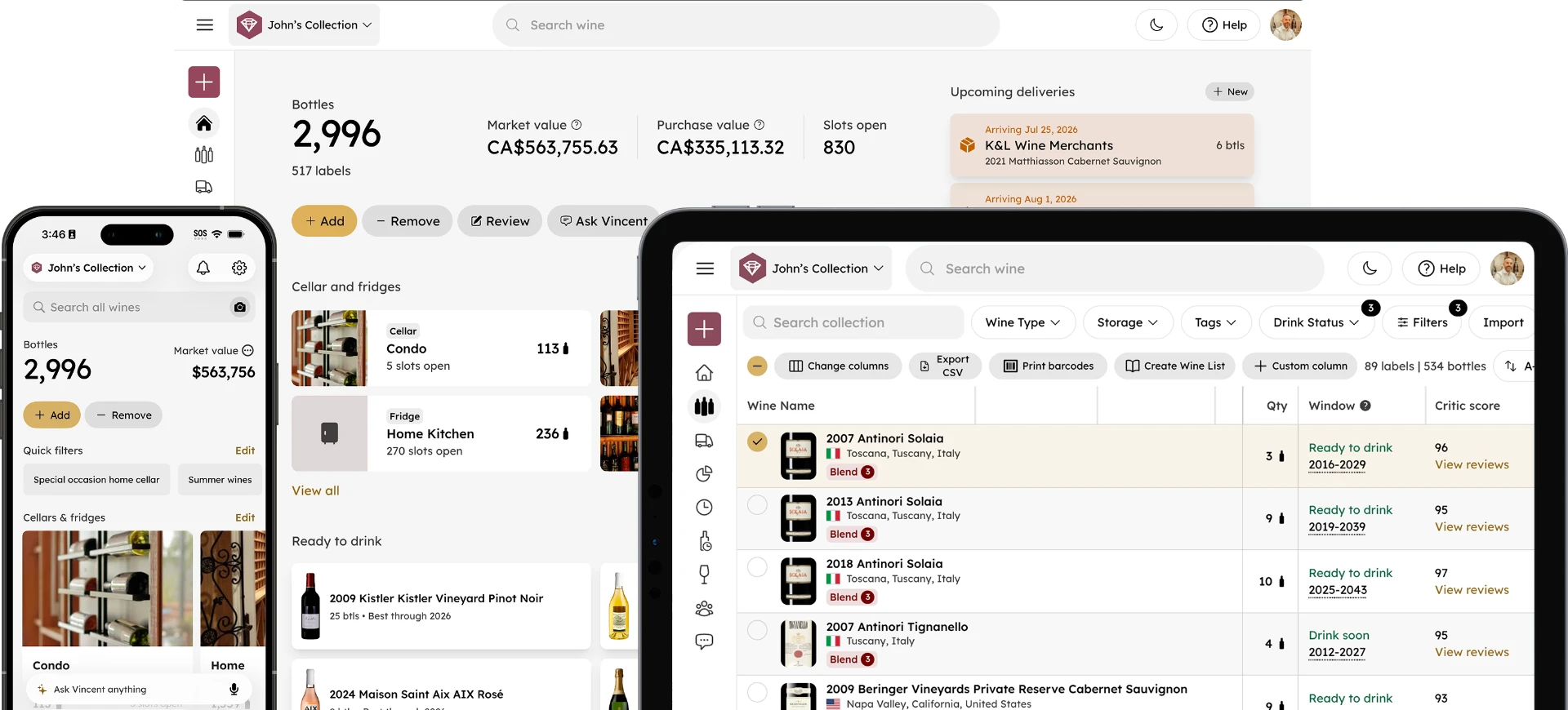
For collectors who want to go further, mapping your cellar digitally gives you a searchable, visual record of where every bottle is stored. InVintory's VinLocate technology creates an exact map of your cellar layout for every rack, shelf, fridge, and bin, so you can find any bottle instantly by simply searching a bottle name in the app. For a full guide to setting up VinLocate, this post on mapping your cellar for fast bottle finding covers the setup process in detail.
If you store wine in a dedicated fridge, InVintory's fridge templates for EuroCave, LeCavist, Wine Enthusiast, and other major brands let you map your exact layout in minutes. This guide to setting up your wine fridge in InVintory walks through the full process.
Step 3: Build a Digital Inventory
Do you need a digital inventory to organize a wine cellar?
You don't need one to get started, but you will need one to stay organized as your collection grows.
Use a digital inventory system or app to keep track of your collection. This is especially helpful for managing large collections and planning future purchases.
A spreadsheet may work for 20 bottles. But at 50 or more, it starts to break down. Fields don't update automatically, drinking windows require manual calculation, and market values go stale the moment you enter them. For a detailed look at why collectors move from spreadsheets to dedicated apps, this post on upgrading from spreadsheets to wine apps covers the inflection point where manual tracking stops working.
A dedicated wine app like InVintory gives you:
- Automatic drinking window tracking: Every bottle's optimal window is calculated and updated without manual input
- Market value tracking: Current pricing data updated automatically across your collection
- Location tracking: Every bottle assigned a precise physical location, searchable instantly
- Saved Lists: Custom groupings for occasions, priorities, or categories that sit alongside your main inventory
- Ready to Drink: A home screen view of every bottle currently in its peak window, updated automatically
The combination of physical organization and digital tracking is what takes a cellar from a collection of bottles to a genuinely manageable asset.
Step 4: Build Habits That Keep It Organized
How do you maintain a wine cellar organization system over time?
The most common reason cellar organization breaks down is not a bad system: it's inconsistent habits. A system only works if you use it every time.
The two habits that matter most are logging additions immediately and removing bottles as soon as they're consumed. Both take seconds with a dedicated wine app. Both are easy to skip and hard to catch up on after weeks of neglect.
Think of wine inventory not as accounting, but as storytelling. Your collection reflects your preferences, experiences, and the meals and memories they'll one day accompany. Framing the habit that way makes it feel less like admin and more like part of the collecting experience itself.
A practical approach
Keep InVintory open while you're in your cellar. Add new arrivals before you put them away. Remove bottles in the app before you pull the cork. The habit pairs naturally with the physical action, which makes it easier to sustain. InVintory’s AI Sommelier, Vincent, can even help you with basic tasks like adding and removing bottles from your digital inventory, and he can take instructions via voice command while you’re standing in front of your cellar. Our post on Vincent’s collection management features has the full breakdown.
An annual review is also worth building into your calendar. Once a year, walk your cellar and reconcile your physical stock against your digital inventory. Check what's entered its drinking window that you haven't opened yet. Identify regions or styles that have grown out of proportion. Decide what to prioritize opening, selling, or gifting in the year ahead. InVintory's Collection Analytics gives you the data layer this review depends on. For more on how to use it, this post on collection analytics covers what it shows and how to act on it.
Wine Cellar Organization for Different Collection Sizes
How does organization change as a collection grows?
The right approach shifts significantly between 50, 200, and 500 bottles.
Under 50 bottles
A simple style or regional grouping with a basic digital log is sufficient. Focus on getting the habit of logging right rather than perfecting the system.
50 to 200 bottles
A hybrid regional and drinking window system starts to pay off. This is the stage where digital inventory becomes genuinely necessary rather than just helpful, and where VinLocate location tracking starts saving meaningful time.
200 or more bottles
Full cellar mapping, automatic drinking window tracking, and regular collection analytics reviews become essential. At this scale, the cost of a disorganized cellar (like missed drinking windows, forgotten bottles, and poor buying decisions), is significant enough to justify investing seriously in the system.
For collectors building toward a larger collection, this guide to building a wine collection from 50 to 500 bottles covers how the approach should evolve at each stage.
Start Organizing Your Collection in InVintory →
Frequently Asked Questions
What is the best way to organize a wine cellar?
The most effective approach for serious collectors is a hybrid system that organizes by region at the top level and by drinking window within each region. This tells you both what you have and when to open it. Pair that with a digital inventory that tracks locations, drinking windows, and market values automatically.
Should I organize wine by red and white?
Organizing by style (red, white, sparkling, rosé) is a good secondary layer within a larger system, but it works best in combination with regional or drinking window organization rather than on its own. Style alone doesn't help you know when to open a bottle or where to find it in a large cellar.
How do I keep track of where bottles are in my cellar?
InVintory's VinLocate technology maps your exact cellar layout and assigns every bottle a precise location. Searching for any wine highlights exactly where it's stored, eliminating the need to manually look through labels or check multiple racks.
How often should I reorganize my wine cellar?
You shouldn't need to physically reorganize your cellar if you maintain a consistent system from the start. An annual review (including checking your digital inventory against physical stock and assessing what needs to be opened, sold, or repositioned), is sufficient for most collectors.
Do I need a wine cellar app to stay organized?
A dedicated wine app is not strictly necessary for very small collections, but it becomes effectively essential above 50 bottles. Spreadsheets and manual records don't scale, don't update automatically, and don't surface the information you need at the moment you need it. InVintory is free to download and covers the core tracking needs of most collectors without a paid subscription.
How do I organize a wine fridge vs a full cellar?
The principles are the same (region, style, or drinking window), but a fridge typically serves a different function. Most collectors use a fridge for service-ready bottles rather than long-term aging, so organizing by style or occasion works well there. InVintory's fridge templates let you map your fridge layout exactly, so the same digital tracking approach applies regardless of whether you're managing a fridge or a full cellar.
A well-organized cellar doesn't happen overnight, but it doesn't require a major overhaul either. Pick a system, map your storage, build the logging habit, and review annually. The rest takes care of itself.