VinLocate Rebuilt: A Faster, More Realistic 3D Cellar
Madeleine Cruickshank
November 2, 2026 · 4 min read
What changed in VinLocate?
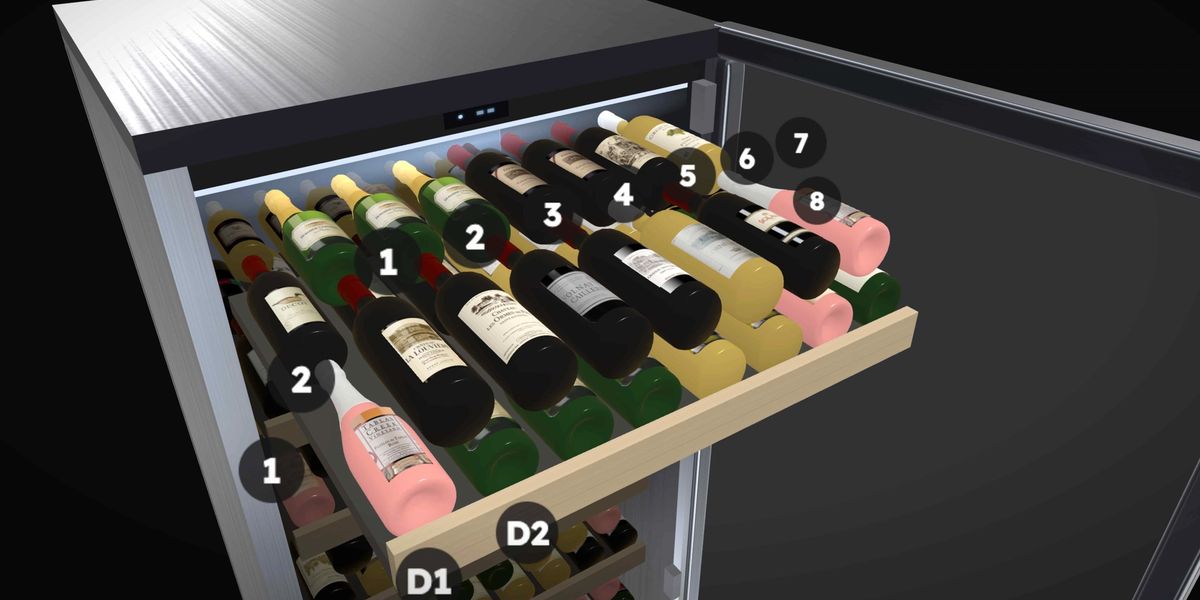
VinLocate, InVintory's 3D view of your cellar, was rebuilt so cellars and fridges load faster, are easier to move around in and look more like the real thing, with new fridge doors, bin placement, quick actions and bulk add on top.
The changes are live on iOS and the web. VinLocate is part of the Premium plan, and Elite members with larger cellars get an extra set of animations, covered below.
What is new in VinLocate?
Faster loading and easier navigation
3D cellars and fridges now load faster and are easier to navigate.
Fridges that look and open like real wine fridges
Fridges now look like real wine fridges. The door opens and the shelves slide out, with fade-in transitions. On the web, fridges also get a visual casing like a real fridge, more realistic opening and closing animations and more realistic lighting inside.
Bottles that sit in bins the way they do in real life
Bottles now sit in bins realistically. For example, two bottles in a 25-bottle diamond bin sit at the bottom of the bin.
Premium animations for larger Elite cellars
Elite members with larger cellars get premium animations when moving between storage sections. If you are not on Elite, you still get the rebuilt cellar and fridges.
What can you do in VinLocate on the web?
Hover over a bottle or case for quick actions
On the web, hover over a bottle or a case to get quick actions such as move and consume.
Select slots, then add bottles in bulk
Select several bottle slots, then bulk add bottles. They are placed into the slots in the same order you selected them.
Change a case's capacity to adjust its visual size
Change the bottle capacity of a case to adjust its visual size.
See into rows that are hidden behind others
When you zoom in on a bottle or section that is hidden by others, the bottles or sections in front of it are hidden. This helps with sections, fridges and racks that are several rows deep, a bit like moving through a video game.
Where do you find the new VinLocate?
Open a cellar or fridge in InVintory on iOS or the web. If you have not set one up yet, start with VinLocate setup: how to map racks, bins and fridges, and for the feature itself see the VinLocate help article.
To keep a mapped cellar accurate over time, see how to keep bottle locations accurate. For fridge layouts, see wine fridge setup templates, and for what a 3D cellar app does in general, see 3D wine cellar apps.
Ready to see your own cellar in 3D? Get started with InVintory, compare plans or learn about Elite.