How to Use InVintory on Web: A Complete Guide
Madeleine Cruickshank
June 22, 2026 · 4 min read

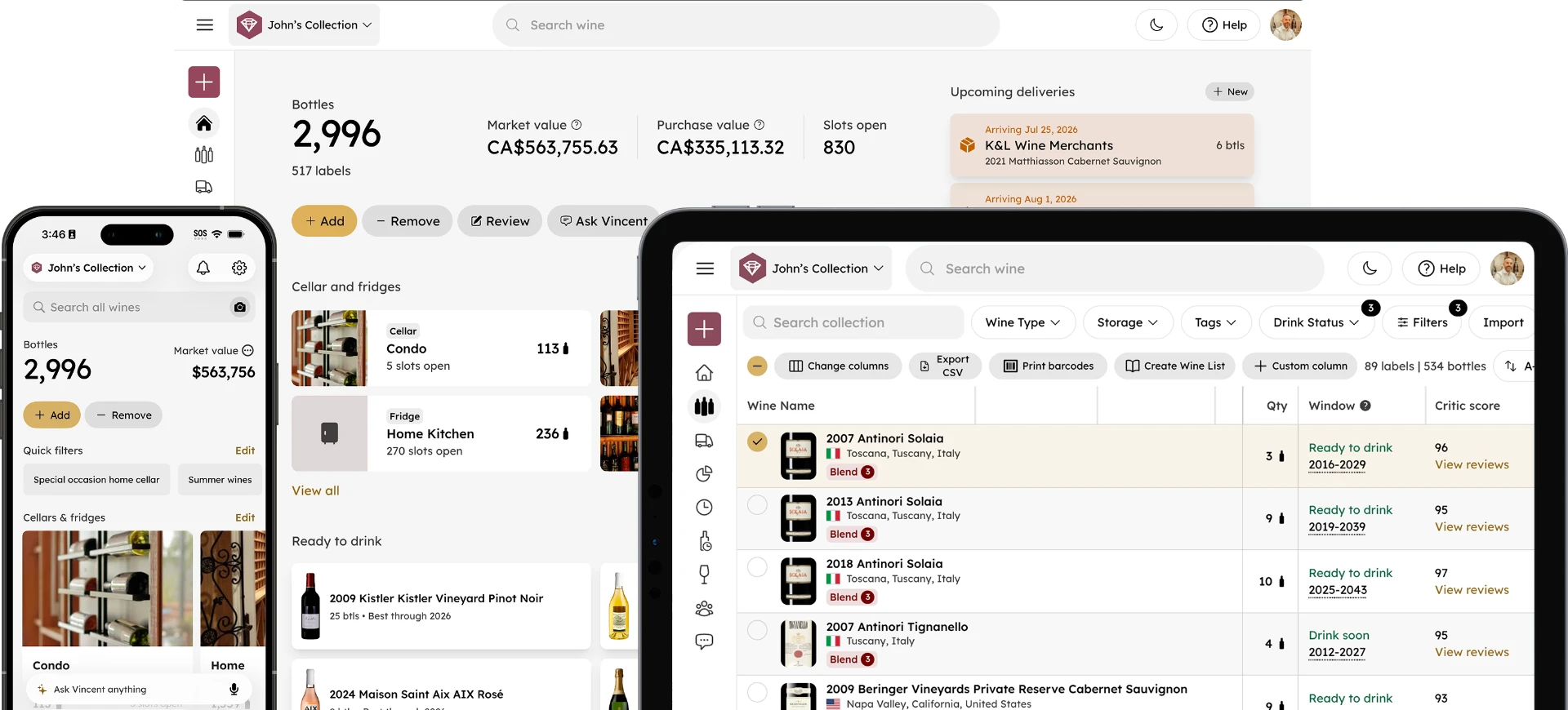
InVintory is available on iPhone, iPad, Android and the web, and the web app is more capable than many collectors realize. If you manage a large collection, do most of your cellar work at a desk, or simply prefer a larger screen for browsing and editing, the web app gives you the full InVintory experience in any browser.
This guide covers everything the web app can do, where it differs from the iOS experience, and how to get the most out of it.
How to Access InVintory on Web
Where do I find the InVintory web app?
Go to app.invintory.com in any browser: Chrome, Safari, Firefox, or Edge. Log in with the same account you use on iPhone, iPad or Android. Your entire collection syncs automatically across all platforms, so everything you've added on mobile is immediately visible on web.
What Can You Do in the InVintory Web App?
Does the web app have the same features as the iPhone app?
Most features available on iPhone are also available on web. A few are only available in the mobile apps (such as label scanning using your phone's camera), but the core collection management, VinLocate, Vincent, Collection Analytics, and delivery tracking are all fully functional on web.
Here's what you can do on web:
Collection management
- Browse, search, and filter your full collection
- Add bottles by searching the database
- Edit bottle details including vintage, quantity, location, and notes
- Remove or consume bottles
- Review wines
- Export your collection as a CSV
VinLocate
- View and edit your 3D cellar and fridge layouts
- Assign bottles to specific slots
- Browse your cellar visually by storage location
Vincent
- Open a chat with your AI sommelier
- Ask about food pairings, drinking windows, specific bottles, and collection recommendations
- Set your taste preferences using the Preferences panel
Analytics
- View Collection Analytics including total value, spend history, and collection distribution
- Edit market prices directly by hovering over any wine's market price in your collection list
Deliveries
- Create and manage incoming wine shipments
- Receive deliveries into your collection
Saved Lists and Past Bottles
- Create and manage Saved Lists
- Browse your full consumption history in Past Bottles
- Add custom tags and fields to further organize your collection
Features That Work Best on Web
What is the web app particularly good at?
Editing market prices
On web, you can hover over any wine's market price in your collection list and edit it directly. This is the fastest way to correct or adjust pricing data across your collection. For more on InVintory's market pricing system, this post on the wine pricing update covers how prices are sourced and how to manage them.
Bulk editing and management
The larger screen makes working through your collection faster when you need to make edits across multiple bottles, like updating locations after reorganizing your cellar, correcting vintages after an import, or reviewing drink window data for a large number of bottles.
VinLocate setup
Building and editing your cellar layout is faster on a larger screen, particularly for complex cellars with multiple sections. The VinLocate builder on web gives you the same tools as iOS with more space to work.
CSV import
Uploading a spreadsheet import is typically easier from a desktop browser. For more on the import process, this post on importing a large collection covers every method in detail.
Features Not Available on Web
What can I do on iPhone and Android that I can't do on web?
Label scanning
The camera-based label scan feature requires a physical camera, so it's only available on iPhone, iPad and Android. On web, you add bottles by searching the database manually.
CellarSticker scanning
NFC scanning for CellarStickers requires an iPhone.
Voice input for Vincent
The microphone icon for speaking to Vincent is available on iPhone, iPad and Android. On web, Vincent is text-only.
Setting Up InVintory on Web for the First Time
How do I get started with InVintory on web?
If you already use InVintory on iPhone, iPad or Android, everything is already there. Log in at app.invintory.com and your full collection is waiting.
If you're new to InVintory and starting on web, the setup process is the same as on iOS:
- Create a free account at app.invintory.com
- Import your existing collection from CellarTracker, Vivino, or a CSV spreadsheet if you're coming from another platform
- Create your storage locations and begin mapping in VinLocate
- Open a chat with Vincent and introduce yourself
For a full getting started walkthrough, this post on setting up InVintory covers every step in detail.
Open InVintory on Web →
Frequently Asked Questions
Is InVintory free on web?
Yes. InVintory's free tier is available on web with the same features as the free iOS plan. Premium and Elite features including VinLocate, Vincent, and Collection Analytics are available with a paid subscription. See invintory.com/pricing for the full comparison.
Does my collection sync between iOS, Android, and web automatically?
Yes. Your collection, cellar layouts, saved lists, deliveries, and all other data sync automatically across iPhone, iPad, Android and web in real time.
Can I import my collection on web?
Yes. InVintory supports direct import from CellarTracker, Vivino, and CSV spreadsheets on the web app. Go to your Collection settings and select Import to get started.
Can I use Vincent on web?
Yes. Vincent is fully available on the InVintory web app for Premium and Elite members. Open a chat from the web dashboard and ask anything about your collection.
Everything you can do in InVintory is available from a browser. Log in and your cellar is waiting.