Best Wine Bar Inventory Software Compared
Madeleine Cruickshank
October 5, 2026 · 6 min read

Which wine bar inventory software is best for a single-location bar?
For most independent wine bars, the deciding factor is whether the software is actually built around wine specifically or adapted from general liquor inventory tools. InVintory and BinWise are purpose-built for wine programs, while WISK and Partender are broader liquor inventory tools that also handle wine.
InVintory for Hospitality
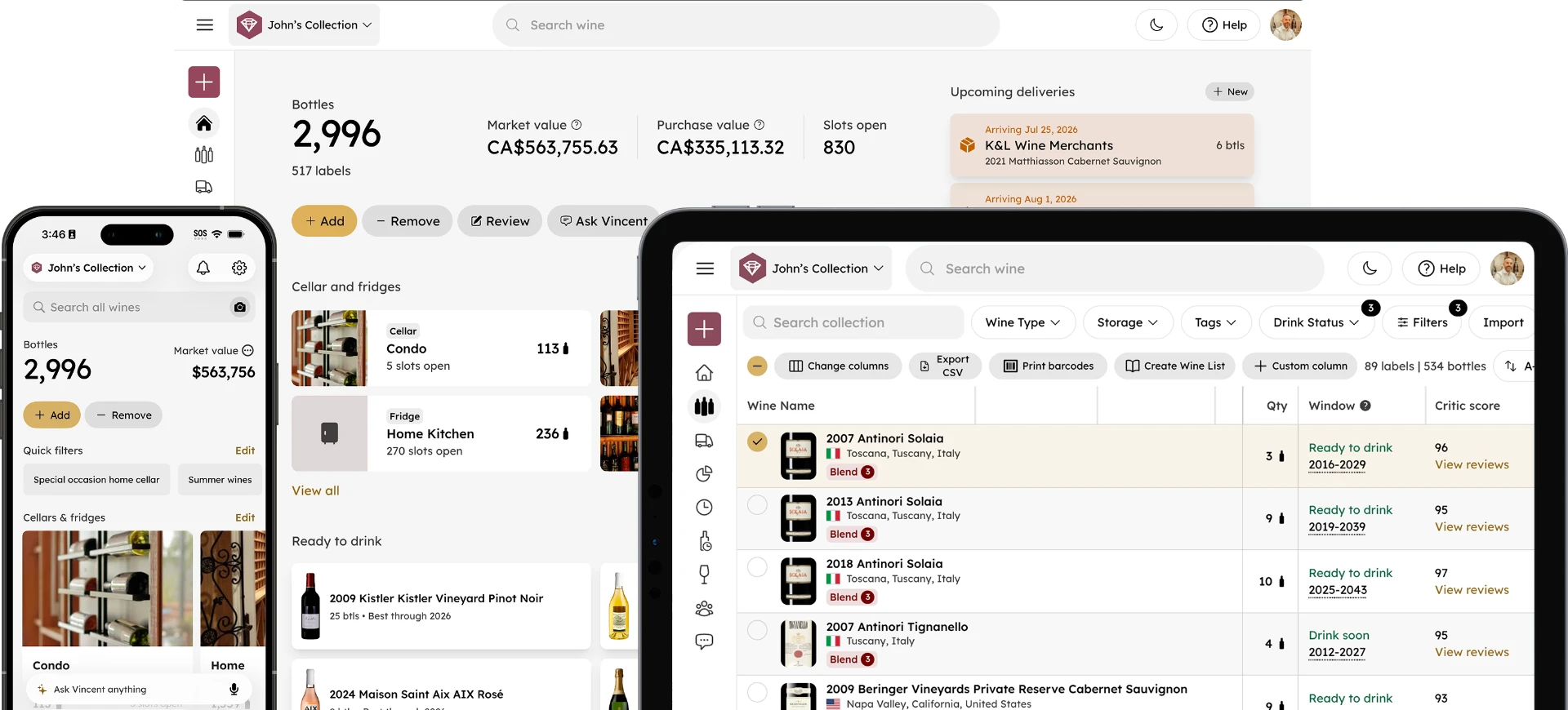
InVintory's core strength is visual, location-based tracking: VinLocate maps exactly where every bottle sits, which matters as much for a wine program with a dedicated cellar or wine wall as it does for an individual collector. Combined with automatic drink window tracking and real-time valuation, it's built for wine programs that want more than a running count of bottles on hand.
Best for: wine-focused restaurants and bars that want visual cellar mapping alongside inventory tracking, and want a platform that also supports collector-style tracking (vintages, drink windows, valuation) rather than just stock counts.
BinWise
BinWise is built specifically for wine and beverage programs, with bin-level tracking, vintage and producer cataloging, and point-of-sale integrations for restaurants running an active wine list. It's positioned toward wine-heavy restaurant programs and includes sommelier-oriented tools alongside standard inventory tracking.
Best for: restaurants with an extensive wine list that need deep vintage-level cataloging and POS integration, and are less focused on visual cellar mapping.
WISK
WISK takes a broader beverage-inventory approach, combining counting, automated ordering, recipe costing, and variance reporting across an entire bar program, not just wine. It's built for operations managing wine alongside spirits, beer, and cocktail programs as one unified inventory.
Best for: bars and restaurants managing a full beverage program where wine is one category among several, rather than the primary focus.
Partender
Partender is built around fast visual counts: staff open a bottle's image on a phone or tablet, tap the fill level, and swipe to the next bottle. It prioritizes speed of counting over deep cataloging detail.
Best for: bars that need to run frequent, fast physical counts across a large, mixed liquor and wine inventory, and prioritize count speed over wine-specific detail like vintage tracking.
Feature Depth Where It Matters Most
Vintage and producer-level cataloging
InVintory and BinWise both track a bottle by producer and vintage, not just as a generic SKU. WISK and Partender are built around counting, ordering, and costing across a whole bar, so confirm in a demo how each records vintage and producer before relying on it for a wine-focused list.
Staff-facing lookup speed
During service, a server needs to find a specific bottle fast, whether that's confirming stock before recommending it or locating it physically. InVintory's VinLocate gives staff a visual map to the exact storage location. BinWise also tracks bin locations and on-hand counts, so if physical location matters to you, ask each vendor to show how a server would find a bottle mid-service.
Variance and shrinkage tracking
All four tools report variance between expected and actual stock, though the starting point differs. WISK and Partender center on fast counts and usage reports across a whole bar. BinWise compares POS sales against inventory depletion by wine, by shift, or by storage location, and InVintory ties variance alerts to per-bottle records, which suits a program where knowing exactly which bottle went missing matters as much as knowing something did. For how often to count, see our bar wine inventory count guide, and for the mechanics of reconciling the numbers, see how variance tracking works.
Migrating From a Spreadsheet or Another Tool
Most wine bar programs start on a spreadsheet or a general POS-adjacent tracking sheet before moving to dedicated software, and the switch is less disruptive than it sounds. Export your current list, import it into whichever platform you choose, and verify the data before relying on it for a live service night. For the general mechanics of this kind of move, see our spreadsheet migration guide, which covers the same import and verification steps that apply here.
What to Ask Before You Commit
Before choosing a platform, get clear answers on whether staff can access it from a phone or tablet during service (rather than only from a back-office terminal), and how quickly you can realistically get a full inventory loaded in before going live. A platform that's feature-rich but takes a month to properly set up isn't necessarily the better choice for a program that needs to be operational immediately.
How to Choose Between Them
If wine is the primary focus of your program, InVintory or BinWise will serve you better than a general liquor tool, since both are built around wine-specific details like vintage and producer rather than treating a bottle as a generic SKU.
If you want visual cellar mapping, not just a stock count, InVintory's VinLocate is a meaningful differentiator, letting staff find a specific bottle by location rather than by scrolling a list.
If wine is one part of a broader liquor program, WISK's unified approach across categories may fit better than a wine-specific tool.
If speed of physical counting is your main pain point, Partender's tap-to-count method is built specifically to solve that, though it trades some wine-specific depth for count speed.
Do I need a wine-specific tool if I already have general liquor software?
Not necessarily. A general liquor tool is built around counts and costs across every category, so check whether it records vintage, drinking window, and storage location before assuming it does. If your wine program is a meaningful part of your business, a wine-specific tool or a wine-specific module within your existing system is worth evaluating.
For a broader look at the pain points a dedicated wine inventory tool solves day to day, see our guide to common wine inventory mistakes, and for keeping a wine list current week to week, see how to update a restaurant wine list.
See how InVintory handles a working wine program.
Explore InVintory for hospitality →
The right choice depends less on which tool has the most features overall and more on whether wine is the main event or one category among several in your program.
Want to see InVintory in your own wine program?
Whatever you choose, the switch from a spreadsheet to dedicated software tends to pay off fastest in the areas that cost real money when they go wrong: missed reorders, variance nobody caught in time, and staff spending service time searching for a bottle instead of serving the table in front of them.
FAQ
Is InVintory only for individual collectors, or does it work for restaurants too?
InVintory supports both. Its hospitality-focused features extend the same visual cellar mapping and tracking tools that individual collectors use to restaurant and wine bar programs.
What's the difference between BinWise and a general liquor inventory tool like WISK?
BinWise is built specifically around wine, with vintage and producer-level cataloging and bin-level tracking. WISK covers wine as one category within a broader beverage inventory system, alongside spirits, beer, and cocktail costing.
What's the difference between InVintory and BinWise?
Both are built specifically for wine, with vintage and producer-level cataloging rather than generic SKU tracking. The main difference is what each prioritizes beyond that baseline: BinWise leans toward POS integration and sommelier-oriented tools for restaurant service, while InVintory leans toward visual cellar mapping through VinLocate, letting staff locate a specific bottle by its physical position rather than by searching a list. If cellar visualization matters as much to your program as vintage cataloging does, that's the clearest point of difference between the two.