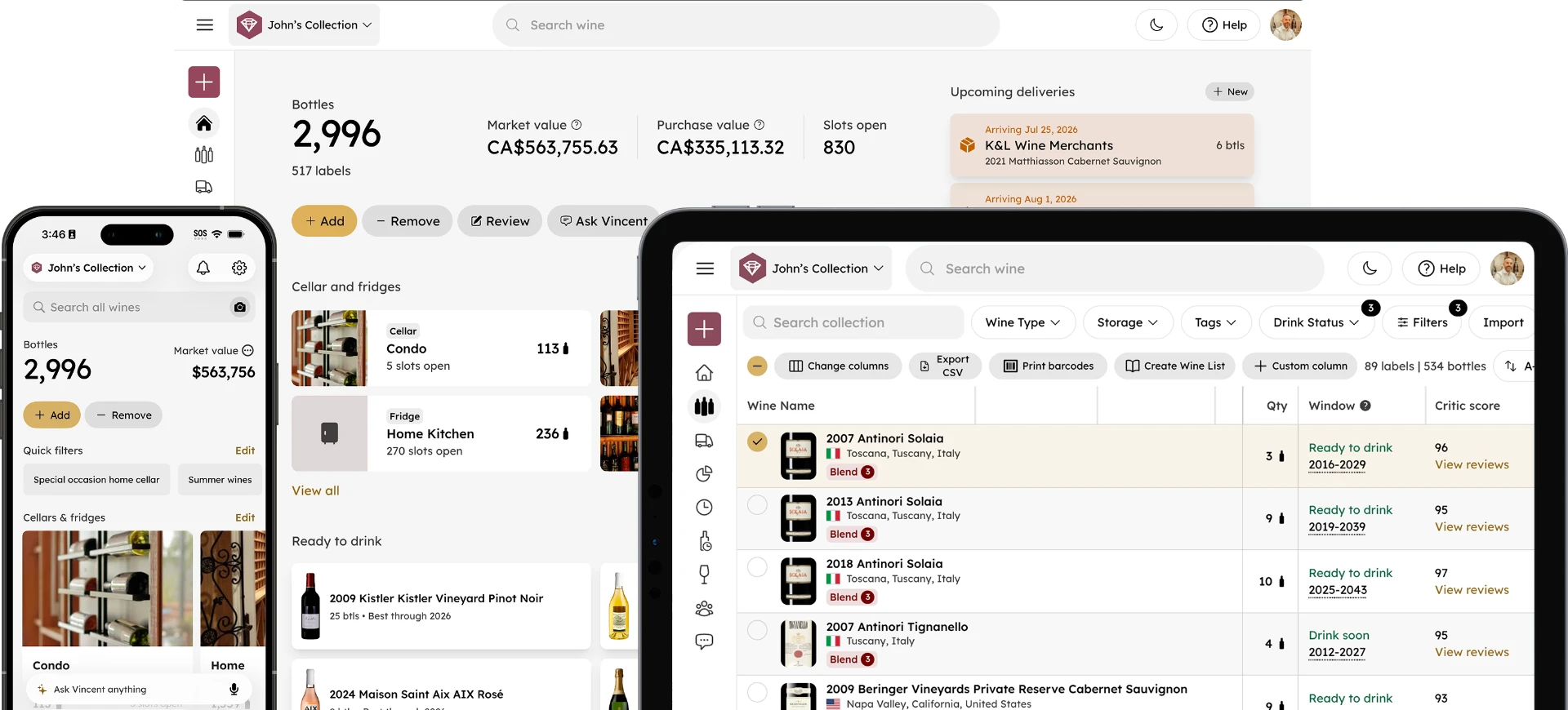
Track Your Wine Tasting Notes and Consumption History
Rachel Daiter
September 17, 2025 · 4 min read
Every bottle you open is part of your story as a collector. The problem is that most apps are built to manage what you currently own, not to remember what you've already enjoyed.
Past Bottles changes that. It gives you a permanent, searchable record of every wine that has left your collection, with tasting notes, removal reasons, and filtering tools that make your wine history as useful as your active collection.
What Is Past Bottles?
Past Bottles is a structured archive of every bottle you have removed from your collection in InVintory.
Unlike your Activity Feed, which shows a chronological log of recent actions, Past Bottles is built as a dedicated, searchable history. Every wine you consume, gift, or otherwise remove from your collection is stored here permanently, with the same detail and searchability as your active collection.
Think of it as your personal wine tasting log: a record not just of what you drank, but how it tasted, when you opened it, and what you thought of it over time.
What Can You Do With Past Bottles?
Can I search and filter my wine consumption history?
Yes. Past Bottles supports the same search and filtering tools as your active collection.
Filter by wine type, critic score, purchase price, or removal reason. Search by producer, region, vintage, or varietal. Whether you're looking for a specific bottle you consumed two years ago or trying to identify a pattern in what you've been enjoying, the tools are there to help you find it quickly.
You can also filter by removal type (consumed, gifted, or otherwise removed), so you can separate bottles you drank from those that left your collection for other reasons.
Can I add and edit tasting notes after a bottle is gone?
Yes. Past Bottles lets you view and edit reviews on any bottle in your history, even after it has been removed from your active collection.
Add a tasting note the night you open a bottle, then return to it later to update your impressions as your memory of the wine settles. Over time, your tasting notes become a genuine record of how your palate has developed and which producers and styles consistently deliver for you.
Can I export my wine consumption history?
Yes. Past Bottles includes CSV export, so you can pull your full consumption history into a spreadsheet for reference, sharing, or personal record-keeping.
This is particularly useful for collectors who track spending across vintages, maintain records for insurance purposes, or simply want a backup of their wine history outside the app.
Why Keeping a Wine Tasting Log Matters
How does tracking consumed bottles improve your collection over time?
Tracking what you've consumed helps you make better decisions about what to buy next. When you can see which producers, regions, and varietals have consistently delivered the wines you've enjoyed most, your future purchases become more informed and more personal.
Without a record, those patterns are easy to miss. You remember the standout bottles but forget the details like the vintage, the producer, or the context. A structured wine tasting log captures those details automatically, so your history informs your future instead of fading with time.
What is the difference between Past Bottles and the Activity Feed?
The Activity Feed is a chronological log of recent actions across your collection. It's useful for keeping track of what you've done lately, but it isn't designed as a long-term archive.
Past Bottles is built specifically as a permanent, searchable record of removed bottles. It doesn't scroll away or get buried under newer activity. Every bottle you've ever removed from your collection is there, searchable and filterable, for as long as you use InVintory.
How Past Bottles Fits Into Your Collection Management
A well-managed wine collection isn't just about what you currently own. It's about understanding the full picture: what you've bought, what you've opened, what you've loved, and what you'd do differently.
Past Bottles closes the loop that most wine apps leave open. Your active collection tells you what you have. Your analytics tell you what it's worth. Your Ready to Drink list tells you what to open. And Past Bottles tells you what you've already enjoyed and what those bottles tasted like when you did.
For collectors who want to go deeper on how apps help prevent the financial and experiential cost of poor cellar management, this post on the real cost of mismanaging a wine cellar covers the full picture.
Getting Started With Past Bottles
Past Bottles is available to all InVintory users. To access it, follow the steps in our step-by-step help article.
If you want to get more out of your collection beyond just tracking what you've consumed, including drink window automation, AI-powered recommendations from Vincent, and full collection analytics, see everything included in Premium.
Frequently Asked Questions
What is Past Bottles in InVintory?
Past Bottles is a searchable archive of every bottle you have removed from your InVintory collection. It stores consumption history, tasting notes, removal reasons, and bottle details permanently, so your wine history is always accessible and searchable.
How do I find my consumed bottles in InVintory?
You can access Past Bottles directly within the InVintory app. For a full walkthrough, see our step-by-step help article.
Can I add tasting notes to bottles I have already consumed?
Yes. Past Bottles lets you view and edit tasting notes and reviews on any bottle in your history, even after it has been removed from your active collection. You can add notes at the time of removal or return to update them later.
Can I export my Past Bottles data?
Yes. Past Bottles supports CSV export, so you can download your full consumption history for personal records, sharing, or use outside the app.
Is Past Bottles available to free users?
Yes. Past Bottles is available to all InVintory users. Premium and Elite members have access to additional features including Collection Analytics, Vincent AI Sommelier, and the Ready to Drink list. See the full comparison at invintory.com/pricing.
How is Past Bottles different from the Activity Feed?
The Activity Feed shows a chronological log of recent collection activity. Past Bottles is a permanent, structured archive of every bottle removed from your collection that’s searchable, filterable, and designed for long-term reference rather than a quick activity log.
Your wine history deserves to be as organized as your active collection. Past Bottles makes sure it is.