Wine Guide: Explore Every Detail of Your Bottles in InVintory
Madeleine Cruickshank
December 18, 2025 · 5 min read
Knowing what a wine tastes like is only part of understanding it. The structure behind it, the grapes that make it up, the ideal food to serve alongside it, the right moment to open it: that context turns a good bottle into a great experience.
Wine Guide brings all of that detail into InVintory, right alongside the bottles you already track.
What Is Wine Guide?
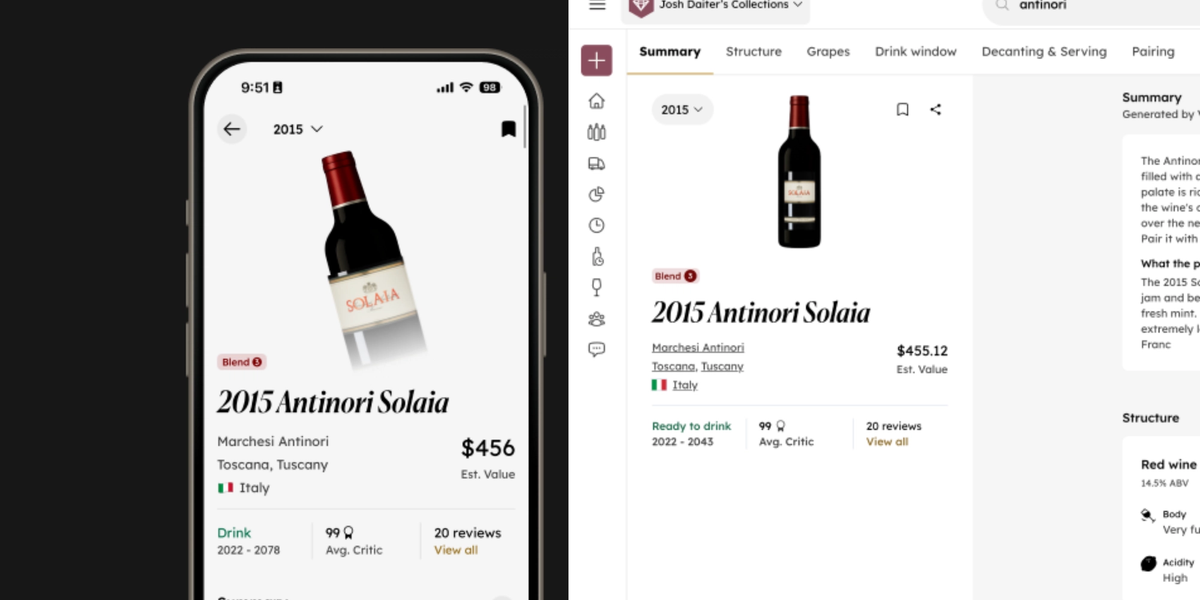
Wine Guide is a new feature in InVintory that gives you a visual, expanded view of every bottle's details directly from its profile page.
For each wine in the InVintory database, Wine Guide surfaces the information collectors need most: structure, grape varieties, drink window, decanting specifics, food pairings, market value, and regional and producer detail. It replaces a flat information layout with something more visual and easier to read at a glance, with the depth available when you want to go further.
Wine Guide is available to all InVintory users across iPhone, iPad, and web.
What Information Does Wine Guide Include?
What wine details are covered in Wine Guide?
Wine Guide covers the full picture of a bottle's profile in one place.
For each wine, you'll find:
- Wine structure — acidity, tannin, body, and alcohol level presented clearly so you know what to expect in the glass
- Grape varieties — the full blend composition, including percentage breakdowns where available
- Drink window — the optimal window for opening the bottle based on vintage and producer data
- Decanting specifics — whether the wine benefits from decanting and for how long
- Food pairings — specific pairing recommendations matched to the wine's profile
- Market value — current pricing data to help you understand what the bottle is worth today
- Region and producer details — background on where the wine comes from and who made it
For a deeper look at how food and wine pairing works within InVintory, this post on what an AI cellar assistant can suggest for pairings covers the full picture.
How do I access Wine Guide?
On iPhone and iPad, tap on any wine in your collection and select Wine Guide from the bottle's profile page.
On web, go to your Collection tab, select a wine, and open Wine Guide from the bottle detail view.
Why Wine Details Matter for Serious Collectors
How does understanding wine structure improve your collection decisions?
Wine structure tells you how a bottle will drink, how it will age, and what it will pair with. A wine with high tannin and acidity is built for aging and needs time or decanting before it shows its best. A lower-structure wine is ready to enjoy sooner with less preparation.
Without that information easily accessible, collectors often open bottles at the wrong time or pair them poorly, not through lack of care but through lack of context. Wine Guide puts that context one tap away from every bottle in your collection.
For a broader look at how understanding wine types shapes better cellar decisions, this post on types of red wine and how to track them is worth reading alongside Wine Guide.
How does Wine Guide connect to drink window tracking?
Every wine in InVintory has a drink window, and Wine Guide makes that information more visible and easier to act on. When you open a bottle's profile, the window is right there alongside the structural and pairing details, so you can make a fully informed decision about whether to open it now or let it rest.
That data feeds directly into InVintory's Ready to Drink feature, which surfaces every bottle currently in its window on your home screen automatically.
For more on the importance of opening bottles at the right time, and what happens when collectors miss their windows, this post on the real cost of mismanaging a wine cellar covers the full picture.
Why does decanting information matter?
Decanting at the wrong time, or skipping it when it's needed, changes how a wine shows in the glass. Young, tannic reds often need significant air to open up. Older wines with sediment need careful, slow decanting. Some wines need neither.
Wine Guide takes the guesswork out of that decision by surfacing decanting specifics for every bottle, so you always know what a wine needs before you open it.
For guidance on storage conditions that affect how a wine develops before you open it, this post on wine storage temperature covers the facts, the myths, and how apps help you stay on track.
Custom Fields and Photos: Also Improved
Alongside Wine Guide, InVintory has updated how Custom Fields and Photos work across iPhone, iPad, and web, making both easier to access and manage.
What changed for Custom Fields and Photos on iOS?
Custom Fields and Photos can now be added and edited directly from the More menu on each wine's profile. If a Custom Field is populated, it displays directly on the wine's label detail page, so your personal notes and data are visible without an extra tap.
What changed for Custom Fields and Photos on web?
Custom Fields and Photos now appear as columns in your Collection list, giving you a cleaner view of your custom data across your full collection. You can create a new Custom Field by selecting a wine and choosing More then Custom Field. Photos can now be added directly from within the Collection list without navigating to a separate detail view.
Frequently Asked Questions
What is Wine Guide in InVintory?
Wine Guide is a feature that gives you a detailed, visual breakdown of every bottle's profile — including structure, grape varieties, drink window, decanting guidance, food pairings, market value, and regional detail — directly from the bottle's page in InVintory.
Is Wine Guide available on web as well as iOS?
Yes. Wine Guide is available on both iPhone and iPad as well as the InVintory web app. Access it by tapping or clicking on any wine in your collection and selecting Wine Guide from the bottle's profile.
Does Wine Guide cover all wines in InVintory?
Wine Guide is available for all wines in the InVintory database. The depth of information available may vary by producer and region, but the feature is designed to surface as much detail as possible for every bottle.
How is Wine Guide different from the standard bottle detail page?
The standard bottle detail page gives you the core inventory information for a wine: vintage, producer, location, and quantity. Wine Guide expands on that with a more visual layout and deeper content covering structure, grape composition, pairing guidance, decanting specifics, and market value, all in one place.
Do I need a Premium membership to use Wine Guide?
Wine Guide is available to InVintory users across plans. To see a full comparison of features across free, Premium, and Elite, visit invintory.com/pricing.
What are Custom Fields in InVintory?
Custom Fields let you add your own data points to any wine in your collection, like purchase location, gifted by, personal scores, or any other detail that matters to you. With the latest update, Custom Fields are easier to add, edit, and view across iPhone, iPad, and web.
Every bottle in your collection has a story worth knowing. Wine Guide makes sure it's always one tap away.