How to Track Wine Deliveries and Shipments in InVintory
Madeleine Cruickshank
June 9, 2026 · 4 min read
A wine collection is always moving. En primeur orders, wine club shipments, and retailer purchases mean bottles are constantly in transit. Knowing what's on its way is as important as knowing what's in your cellar.
InVintory's Deliveries feature gives you a dedicated place to log every incoming shipment, set reminders for expected arrivals, and move bottles directly into your collection the moment they land.
What Is the InVintory Deliveries Feature?
What does the Deliveries feature do in InVintory?
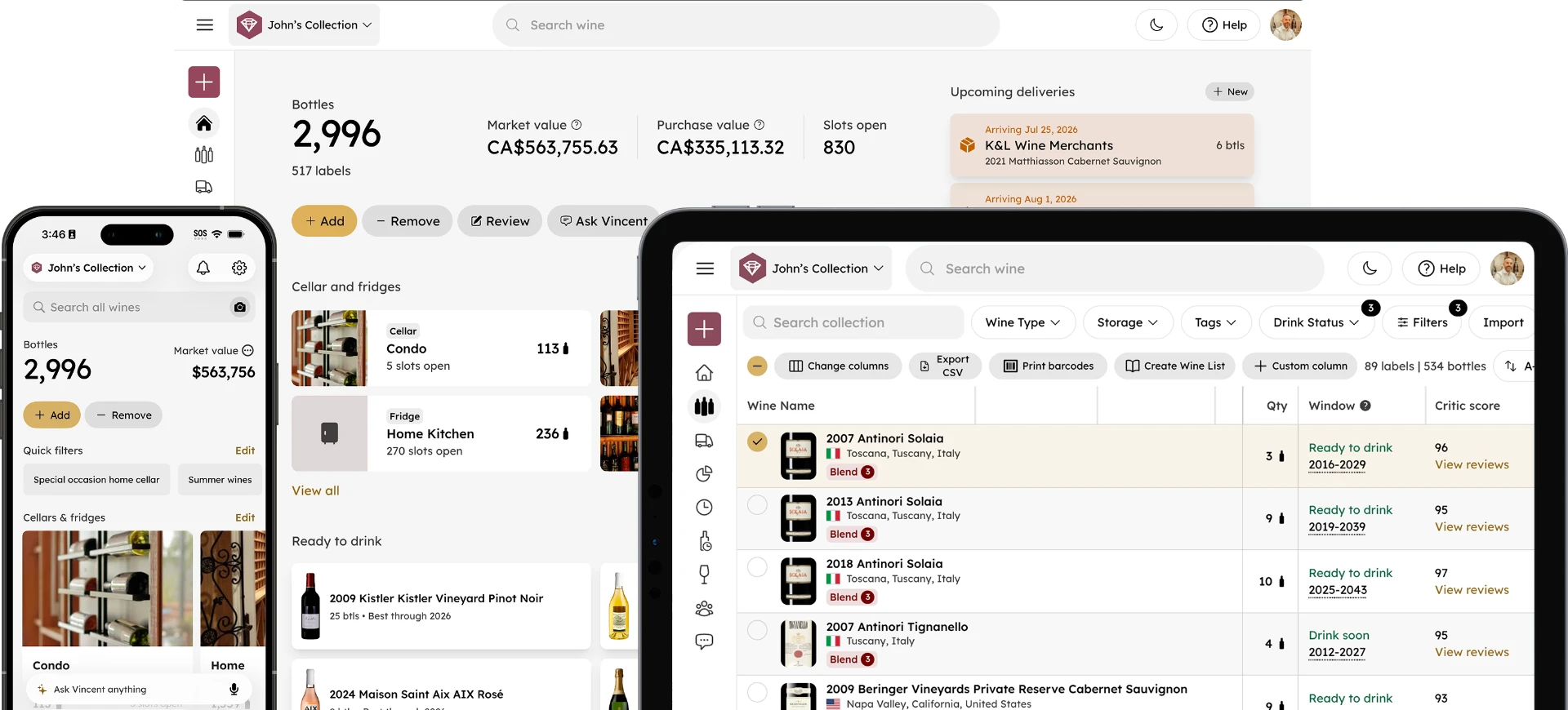
The Deliveries feature is a tracking layer for wine you've bought but haven't yet received. You log an order when you place it, including the wines, quantities, merchant, purchase price, and expected delivery date. InVintory keeps that order visible on your home screen until the bottles arrive.
When your shipment lands, you can add all the bottles to your collection in a single tap, with the purchase data already populated. No re-entry, no searching for what you ordered months ago.
InVintory lets you set reminders for upcoming shipments and track deliveries so you never miss a bottle.
How to Create a Delivery in InVintory
How do I log an incoming wine shipment in InVintory?
You can create a new delivery from the Quick Action menu on the home screen or from the Deliveries section directly.
On iPhone and iPad:
- Tap the menu button on the home screen to open the Quick Action menu
- Tap Create delivery
- Add the merchant name, expected delivery date, and purchase details
- Search for each wine in the order and add quantities
- Save the delivery
The delivery will appear on your home screen under the Deliveries section, showing the merchant, expected date, and bottle count.
On web:
- Go to your InVintory dashboard
- Navigate to the Deliveries section
- Click New Delivery
- Fill in the order details and add the wines included in the shipment
- Click Create
How to Add Delivered Bottles to Your Collection
What do I do in InVintory when my wine arrives?
When a delivery arrives, open the delivery in InVintory and tap Mark as delivered. InVintory moves all the bottles from the pending delivery into your active collection automatically, with purchase prices and dates already attached.
If only part of a shipment arrives (which happens with mixed cases or split orders), you can mark individual bottles or partial quantities as delivered, rather than the full order, leaving the rest in pending status until the remaining bottles arrive.
Once bottles are in your collection, they're immediately available for location assignment in VinLocate, visible in your Ready to Drink list when they enter their drinking window, and accessible to Vincent for recommendations.
Why Tracking Deliveries Matters for Serious Collectors
Why should I log wine orders before they arrive?
The collectors who most benefit from delivery tracking are those managing en primeur orders and regular wine club shipments; categories where the gap between ordering and receiving can be months or years.
En primeur orders are placed before the wine is bottled, sometimes two or three years before delivery. Without a tracking system, it's easy to lose track of what you've ordered, what you've paid, and when it's due to arrive. InVintory's Deliveries feature keeps every en primeur order visible and reminds you when each delivery is approaching. For collectors managing multiple vintages across multiple producers, this visibility is genuinely useful.
Wine club shipments arrive on a regular schedule but vary in contents. Logging expected shipments in InVintory means your home screen always shows what's incoming alongside what you already own, giving you a complete picture of your collection, including bottles in transit.
Retailer purchases often ship weeks after ordering, especially for allocated wines. Logging the order at purchase keeps the bottles in your mental and digital inventory from day one rather than only when the box arrives.
For collectors tracking en primeur specifically, this post on tracking en primeur wine through delivery covers the full workflow in detail.
Using Delivery Tracking Alongside InVintory’s Other Features
How does delivery tracking connect to other InVintory features?
Delivery tracking is most powerful when it connects to the rest of your collection data, which is what InVintory's integration between features makes possible.
When you receive a delivery, the bottles move directly into your active collection and become visible in Collection Analytics, updating your total bottle count and collection value automatically. If you've mapped your cellar with VinLocate, you can assign precise locations to the arriving bottles immediately. And if the bottles are approaching their drinking window, they'll surface in your Ready to Drink list as soon as they're in your collection.
For collectors who want a complete picture of their wine as an asset (what they own, what it's worth, what's incoming, and what's ready to open), the Deliveries feature is the piece that completes the loop.
For more on how InVintory tracks collection value, this post on Collection Analytics covers the full picture.
Track Your Deliveries in InVintory →
Frequently Asked Questions
Can I track en primeur wine orders in InVintory?
Yes. InVintory's Deliveries feature is well-suited to en primeur tracking. You can log the order at purchase, set the expected delivery date years in advance, and receive bottles into your collection when they arrive. The purchase price and order details carry through automatically.
Can I set a reminder for an incoming wine shipment?
Yes. When you create a delivery, you can set an expected delivery date. InVintory will remind you when the date approaches so you're ready to receive the shipment and add the bottles to your collection.
What happens to my delivery data when bottles arrive?
When you mark a delivery as received, InVintory moves all the bottles into your active collection with purchase price and date already attached. The delivery is closed and your collection is updated automatically.
Can I receive a partial delivery in InVintory?
Yes. If only part of a shipment arrives, you can receive individual bottles or partial quantities, leaving the remaining bottles in pending status until the rest of the order arrives.
Is delivery tracking available on all platforms?
Yes. InVintory's Deliveries feature is available on iPhone, iPad, and the InVintory web platform.
Every bottle you've ordered is part of your collection, even the ones that haven't arrived yet. InVintory's Deliveries feature keeps them visible and trackable, from initial purchase to storage in your cellar or wine fridge.