The Best Wine Apps for Android in 2026
Madeleine Cruickshank
September 8, 2026 · 6 min read

What makes a wine app worth using on Android?
The criteria that matter most on Android are reliable label scanning across widely varying camera hardware, real inventory structure rather than a social feed, and export that isn't locked in. Android's hardware diversity makes the first of those a bigger differentiator than it is on iPhone, where every device sits in a narrow, predictable camera range.
What Is the Best Wine App for Android?
For collectors who want real cellar management rather than casual bottle logging, InVintory is the strongest Android option, since it combines visual cellar mapping, automatic valuation, and an AI sommelier in one app with full web parity. Which app is genuinely best for you still depends on whether you're managing a collection or just remembering what you liked at dinner.
InVintory
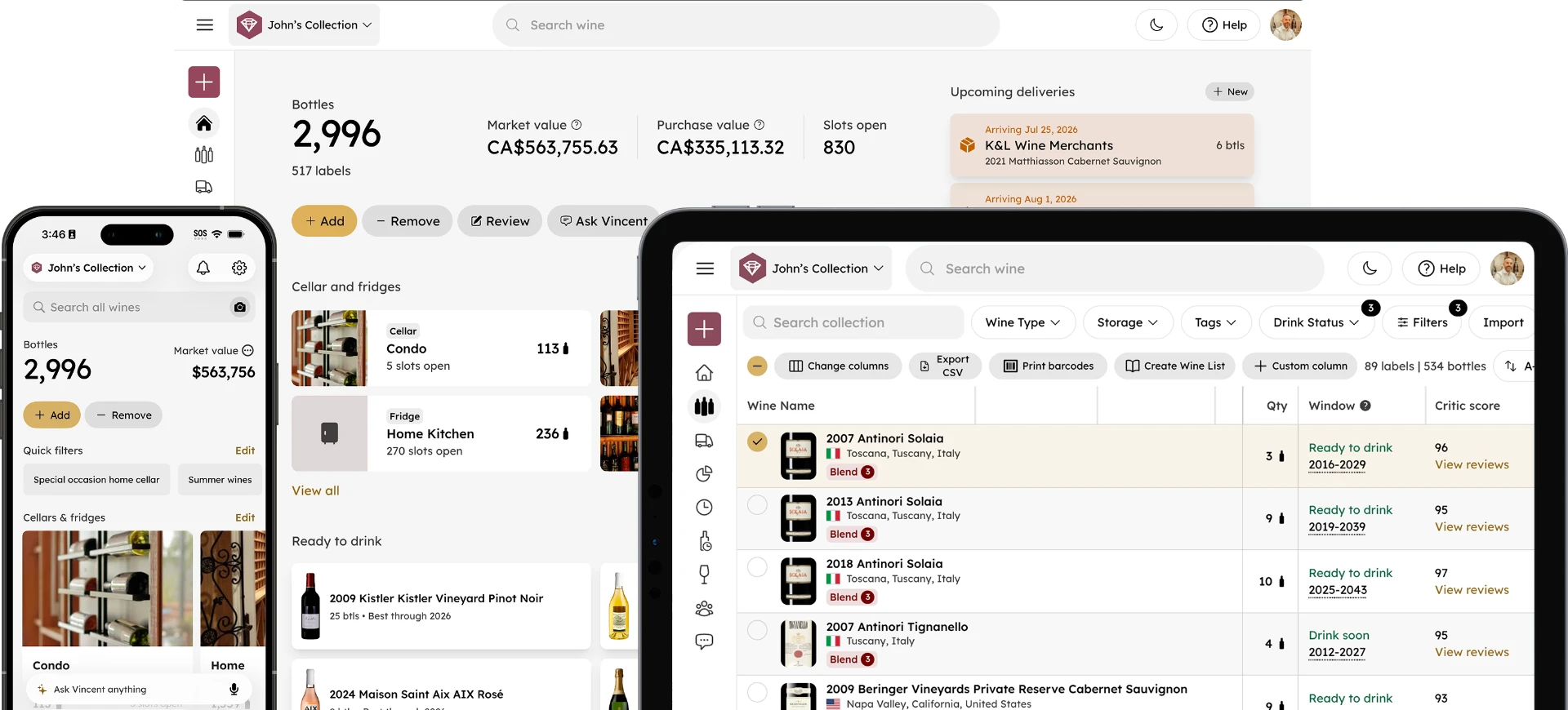
Verdict: the most complete cellar management option on Android. InVintory is available on Google Play with the same core feature set as its iOS and web versions, including VinLocate visual cellar mapping, Vincent (its AI sommelier), automatic collection valuation, and full cross-device sync.
The practical Android advantage is that InVintory's web app is fully built out, so bulk imports, initial cellar setup, and detailed data entry are seamless in a browser regardless of which phone you carry.
Get InVintory on Google Play →
Vivino
Verdict: the best-known option for casual scanning and ratings, not for cellar management. Vivino has a long-established Android presence, and its label scanning and community ratings work well for deciding what to buy at a shop or restaurant. It's built around discovery rather than structured inventory, so it doesn't offer visual cellar mapping or drink-window tracking the way a dedicated collection app does.
CellarTracker
Verdict: community tasting note depth, with a more utilitarian mobile experience. CellarTracker's decades-deep database of user tasting notes remains its defining strength on any platform. Its mobile interface, on Android as on iOS, prioritizes function over polish.
See our full InVintory vs CellarTracker comparison.
OENI
Verdict: a lower-priced option with its own AI features, lighter on cellar structure. OENI offers AI-driven recommendations at a lower price point but lacks the visual cellar mapping and advanced import tooling that larger collections need.
See our full InVintory vs OENI comparison.
Wine-Searcher
Verdict: a shopping companion, not a cellar app. Wine-Searcher is built for price comparison across merchants rather than managing what you already own. Genuinely useful alongside a cellar app, not instead of one.
See our InVintory vs Wine-Searcher comparison.
A note on availability
The Android wine app landscape is not a mirror image of iOS. Several iOS-first wine apps have either no Android build or a materially reduced one, and availability changes over time. Check the current Google Play listing for any app you're considering rather than assuming an iOS recommendation transfers.
Android-Specific Considerations
Does label scanning work as well on Android?
Generally yes, though results vary more across Android devices than on iPhone because camera hardware differs so widely between manufacturers and price tiers. A recent flagship scans labels about as reliably as an iPhone; a budget or older device may need better lighting and a steadier hand. If scanning is your primary way of adding bottles, test it on your specific phone during a trial rather than assuming. For more on scanning accuracy generally, see our comparison of wine label scanner apps.
How do subscriptions work through Google Play?
Paid wine app subscriptions purchased on Android are typically billed through Google Play and managed in your Play Store account rather than in the app, so cancellations and plan changes happen there. If you use the same app across an Android phone and a browser, check whether a subscription purchased on one covers the other, since this varies by app. For what InVintory's tiers include specifically, see our full pricing breakdown.
What about widgets and home screen access?
Android's widget system is more flexible than iOS's, and a wine app that uses it well can put your collection count, current value, or what's ready to drink on your home screen without opening the app. Widget support varies considerably and is hard to evaluate from a store listing, so check during a trial if home screen access matters to how you'd actually use the app.
What about tablets and foldables?
Larger Android screens are genuinely better for cellar management than a phone, particularly for visual layouts and bulk editing. Check whether an app offers a real tablet layout or simply stretches its phone interface, since the difference is significant when mapping racks or reviewing a large collection.
How Do You Move Your Collection to a New Android Wine App?
Export your existing collection as a CSV from your current app, then import it into the new one, ideally from a browser rather than your phone, since bulk import is almost always easier on a larger screen. InVintory supports import from CellarTracker, Vivino, and spreadsheets. For the full process, see our migration guide, and for the fastest path regardless of phone platform, start on the web app.
For a platform-agnostic view of how these apps compare overall, see our full roundup of the best wine apps for collectors. If you're on iPhone rather than Android, see our iPhone equivalent.
Ask Vincent what to open tonight, from your own collection: explore InVintory's AI sommelier →
The best wine app for Android is the one that matches how you actually collect. For a growing cellar, that means structure, mapping, and reliable sync, not just a fast way to rate what's in your glass.
See how InVintory works on your Android device.
Compare Free, Premium, and Elite →
FAQ
What is the best free wine app for Android?
InVintory's Free tier covers unlimited bottle tracking at no cost, which is more generous on core tracking than most free plans in this category. Vivino's free tier is a reasonable alternative if scanning and ratings matter more than cellar management.
Is there an Android wine app that maps my cellar?
Yes. InVintory's VinLocate builds a visual map of your actual storage layout and works across Android, iPhone, iPad, and web, so you can find any bottle by its exact rack, row, and slot.
Which wine app has the best AI sommelier on Android?
Vincent, InVintory's AI sommelier, draws recommendations from your actual collection rather than a generic database, which is the main thing separating it from general AI wine chat features.
Do wine apps sync between Android and web?
This varies by app and is worth confirming before committing. InVintory syncs automatically across Android, iPhone, iPad, and its web app, so your collection stays current wherever you access it.
Can I use the same account on Android and iPhone?
With InVintory, yes, one account works across all platforms. If you're switching phones or your household uses both, this matters more than it might seem.