How to Organize a Wine Collection You Can Actually Use
Madeleine Cruickshank
July 10, 2026 · 7 min read
A ten-bottle collection organizes itself. A hundred-bottle collection does not. Somewhere in between, most collectors realize they own wine they cannot find, cannot remember buying, or have let pass its drinking window. Here is how to fix that, whether you use a notebook or an app.
What is the best way to organize a wine collection?
The best system is the one you will actually maintain. For most collectors, that means grouping bottles by a primary category (region, variety, or price) and then adding a way to locate and track them, whether that is a paper tag, a spreadsheet, or a visual digital map.
Start With Location
Before you organize anything, get the storage basics right. Keep wine somewhere cool, dark, and away from vibration. A closet, basement corner, or wine fridge all work. Store bottles horizontally so the wine stays in contact with the cork.
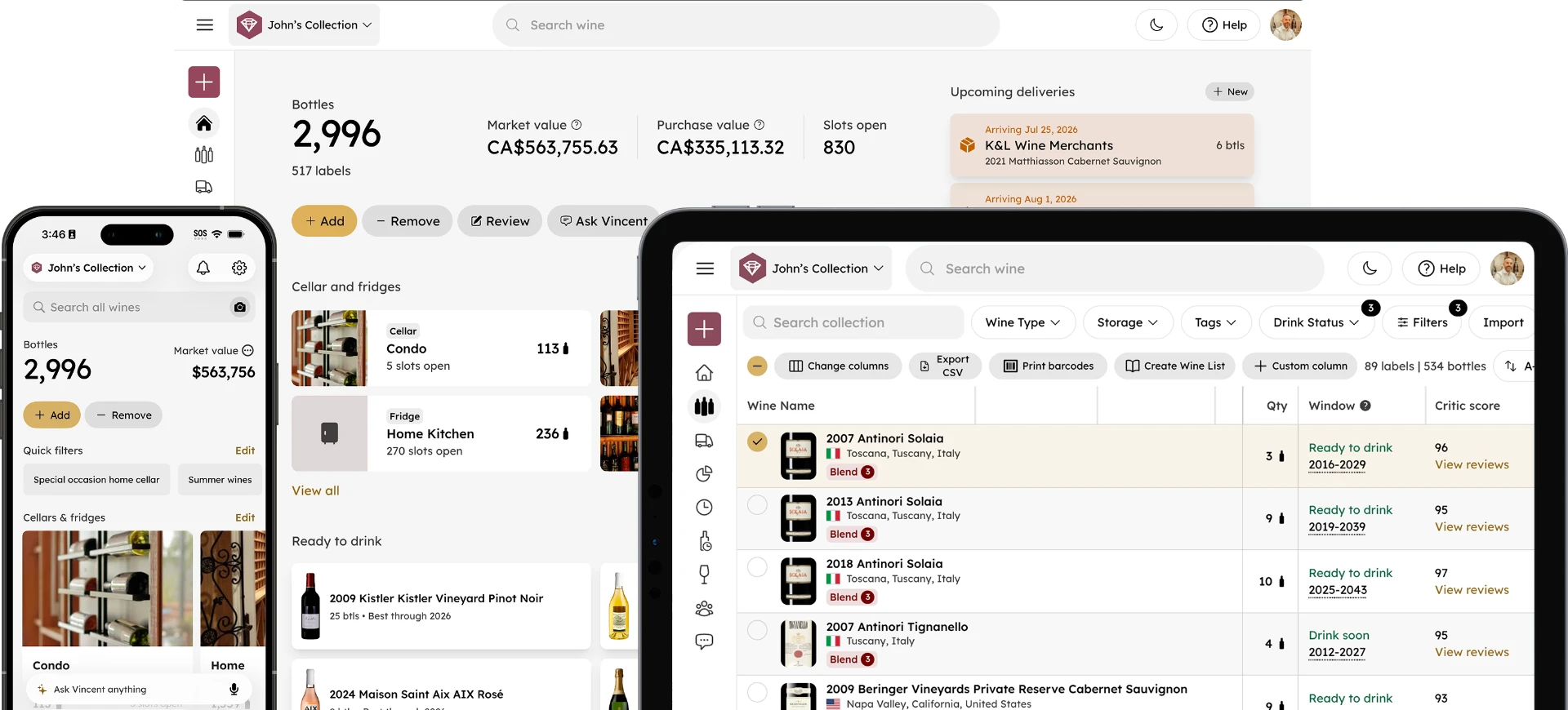
If your budget or bottle count is small, put your everyday bottles at eye level and anything special further back or lower down, out of easy reach. If you're storing across more than one location, such as a home cellar and a condo wine fridge, decide early whether you'll treat them as one combined collection or two separate ones. Most collectors do better tracking everything as a single collection split across storage locations, since it avoids the situation where you forget you own a bottle simply because it's in the "other" place.
Choose an Organizing Principle
There is no single correct way to sort a wine collection. Pick the system that matches how you actually shop for and drink wine.
By region
Common for collectors with a lot of Old World wine. Group by country, then narrow to subregion within each section.
By variety
Works well if you buy based on grape more than place, such as a Cabernet-heavy or Pinot-heavy collection.
By drinking window
Useful if you are actively managing a mix of wines to drink now and wines to hold. Some collectors use colored tags: one color for drink now, another for hold.
By price or occasion
Practical if you keep a mix of everyday bottles and special-occasion wines and want to keep them visually separate.
Most larger collections end up as a hybrid: region first, then variety or vintage within that.
Build a Location Hierarchy, Not Just a List
Once your collection grows past a shelf or two, a flat list of bottles stops being enough. What you actually need is a hierarchy: which storage location the bottle is in, which cellar or wine fridge is within that storage location, and where in that storage section it physically sits.
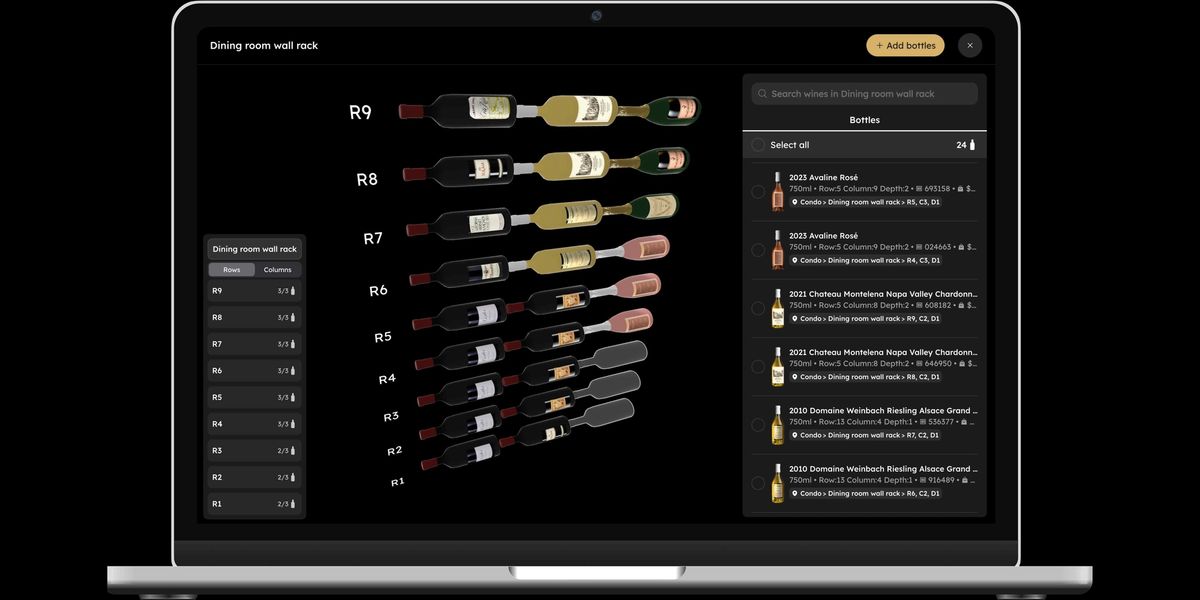
A practical structure looks like this: storage location (for example, "Condo," "Home," or “Cottage”), then storage section ("Dining room wall rack," “Kitchen wine fridge”), then a specific position within it, typically expressed as row, column, and depth. A bottle stored two rows deep in row 5, column 3 of a dining room wall rack has an exact address, the same way a house has a street number. That level of specificity is what makes "where is this bottle" a solved problem instead of an ongoing search.
Why does a spreadsheet get harder to maintain as a collection grows?
A spreadsheet requires you to update it every time you buy or drink a bottle, and every time a bottle’s retail price or drinking window data drifts from reality. It also has no built-in way to show you where a bottle physically sits beyond a text note, only that you own it. Past a hundred or so bottles, most collectors find the upkeep outweighs the benefit, especially once bottles start moving between locations or getting consumed faster than the sheet gets updated.
Where Visual, Digital Tools Take Over
This is where a wine app earns its place, not by replacing your organizing system, but by making it visual and searchable. InVintory's VinLocate feature builds a visual map of your actual cellar or wine fridge, using the same row, column, and depth structure described above, but rendered as an interactive 3D layout rather than a spreadsheet cell.
You place your bottles once, and after that, searching by producer, region, vintage, or price highlights the bottle's exact rack, row, and slot. Select a bottle in your list and its location on the 3D model lights up immediately, complete with the full address: which property, which storage unit, and the exact row, column, and depth. You can also select multiple bottles at once, useful when you're pulling several for an event or reorganizing a whole section.
VinLocate recently got a significant update on InVintory’s web platform, making the daily habit of managing a collection faster:
More screen space and a faster add-bottle flow
Adding a new bottle to your collection now takes fewer steps, and unplaced wines are surfaced automatically so nothing gets lost between purchase and storage.
A smoother way to mark bottles as consumed, gifted, sold, etc.
You can update a bottle's status as either consumed, gifted, sold, donated, expired, broken, or missing, all directly from the VinLocate screen.
Multi-select for bottles and cases
Select several bottles at once to move or remove them together. This is useful when reorganizing an entire section, unpacking a new case, or packing a smaller collection of bottles to transport to a new storage location.
Moving bottles between storage locations
Queue up bottles and move them to a new section, or an entirely different cellar or fridge, in just a few taps from the VinLocate screen.
Smarter case handling
Add a wine case directly into a cellar bin or wine fridge shelf, then stack, rotate, or reposition it by dragging it with your cursor in the VInLocate screen.
None of this replaces the decision of how to organize your wine. It just means once you decide, finding any bottle takes seconds instead of a search through the rack. InVintory is the all-in-one cellar management tool that makes this entire process easy: get started with InVintory for free today.
Quick Filters Save You From Rebuilding the Same Search
Beyond the visual map, most collectors end up running the same handful of searches over and over: "what do I have that's ready to drink," "what's good for a special occasion," or "what should I serve this summer." Rather than rebuilding that search every time, save it as a quick filter. It shows up as a shortcut on your home screen, so pulling up your "summer wines" or "special occasion" bottles takes one tap instead of a fresh search.
Personalize the System
The last step is making the system yours. Some collectors add a shelf for guests versus a shelf for personal favorites. Others organize by occasion: everyday drinking, dinner party bottles, and cellar-worthy wines meant to sit for years.
Whatever structure you choose, the goal is the same: open the right bottle, at the right time, without digging through a rack you have stopped trusting.
Ready to see your own collection this way? Try InVintory free or explore Premium and Elite plans.
FAQ
How many bottles before I need a real organizing system?
Most collectors feel the strain somewhere between 30 and 50 bottles, when it becomes hard to recall everything from memory.
Do I need a wine fridge to use a visual cellar map?
No. VinLocate works for any storage type, including a single wine fridge, a wine wall, or a full cellar with multiple rooms, and it supports tracking multiple properties as part of one collection.
What is the fastest way to organize a wine collection I already own?
Group bottles into two or three broad categories first (for example, by color and rough drinking window), then refine as you go. Trying to build a perfect system before entering a single bottle usually stalls the project.
Can I organize wine across more than one property, like a home and a condo?
Yes. Set up each property as its own top-level location, then add cellars or fridges within each one. Your full collection stays searchable as a single list even though it's physically split across addresses.